
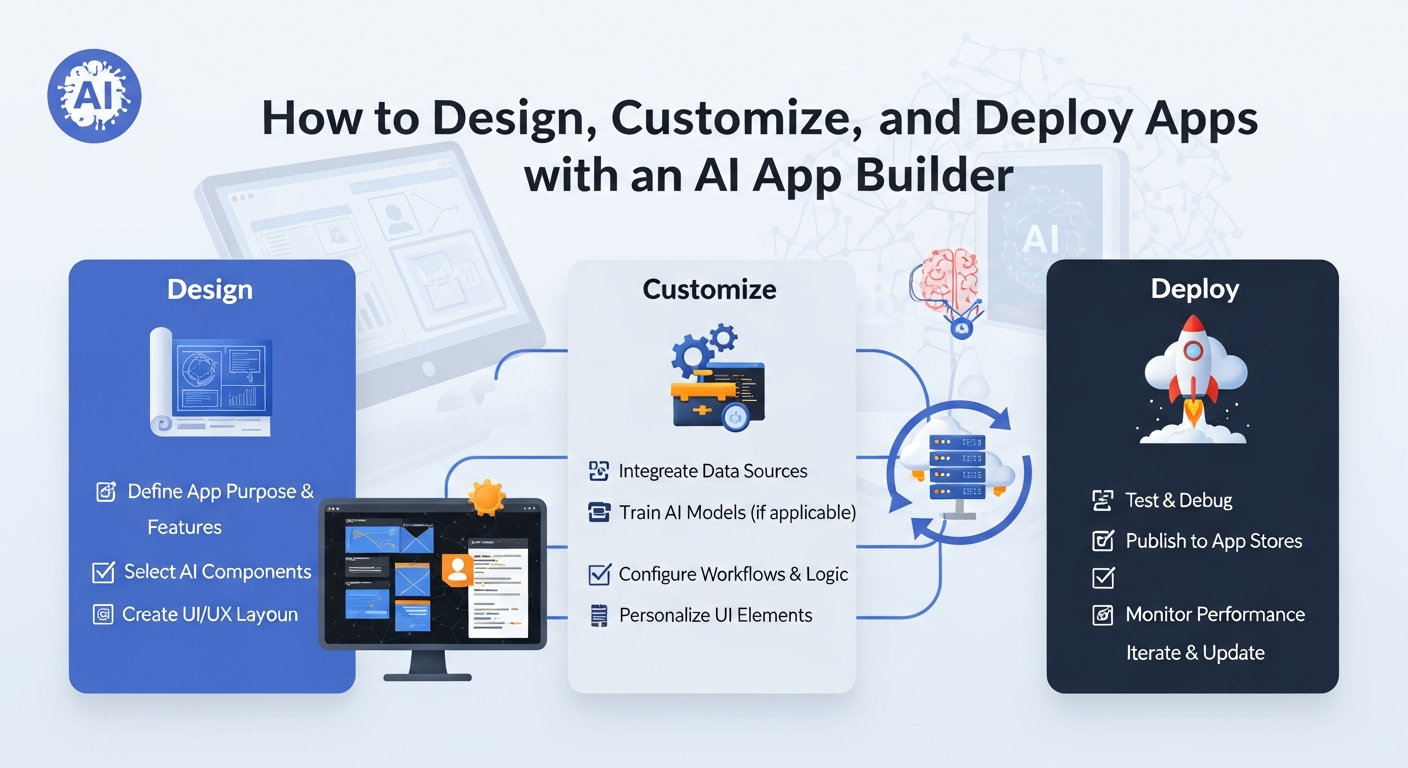
In a fast-paced digital world, turning an idea into a fully functional app can feel overwhelming, especially for individuals or businesses without a technical background. With an AI app builder, this process is no longer reserved for developers. Leveraging intelligent automation and pre-designed components, anyone can design, customize, and deploy an app efficiently and effectively.
1. Choosing the Right Template as a Starting Point
The foundation of an app begins with its structure. Templates offered by modern platforms provide a blueprint that accelerates the creation process. They are crafted to address common app types such as e-commerce, CRM, productivity tools, or internal workflows.
- Pre-built structure
Templates eliminate the need to start from scratch. Key screens such as dashboards, user registration, and data input forms are pre-arranged, ensuring your app has a functional backbone from the outset. - Focused on real use cases
Each template reflects industry standards and user expectations. This approach allows creators to adapt a template for their specific audience rather than trying to invent every component independently. - Ease of iteration
With a template in place, modifications are simplified. Designers can adjust layouts, add new modules, or rearrange content without disrupting the overall flow. This creates a flexible environment for innovation.
2. Customizing the App to Match Your Vision
Once a template is chosen, the next step is customization. Modern AI app makers provide intuitive tools to modify both visual and functional aspects of an app without requiring coding skills.
- Drag-and-drop interface
Users can place buttons, menus, forms, and interactive elements exactly where they are needed. This visual approach reduces errors and simplifies complex workflows. - Brand integration
Apps can reflect a brand’s identity through colors, logos, fonts, and imagery. Such customization ensures consistency across all user touchpoints, building credibility and recognition. - Personalized workflows
Beyond aesthetics, AI-powered builders allow creators to define user interactions, trigger automated actions, and structure data flow. Custom workflows make the app more intuitive and efficient for its intended audience.
3. Incorporating AI Features for Enhanced Functionality
The integration of artificial intelligence transforms apps from static tools into intelligent platforms capable of responding to user behavior and automating complex tasks.
- Predictive analytics
AI modules can analyze user behavior to offer suggestions, automate notifications, or streamline repetitive processes, improving overall app performance. - Smart recommendations
Leveraging AI enables apps to provide personalized experiences. Whether suggesting content, products, or actions, these intelligent features increase engagement and user satisfaction. - Automated decision-making
By embedding AI logic, apps can manage workflows automatically, such as approving requests, sending reminders, or prioritizing tasks, reducing manual intervention and saving time.
4. Ensuring Compatibility Across Devices
A crucial aspect of app development is device compatibility. Users expect a consistent experience whether they access an app from a smartphone, tablet, or desktop.
- Responsive design
Templates provided by AI app builders are inherently adaptable. Elements resize and reposition themselves to fit different screens, preserving usability and aesthetic appeal. - Cross-platform deployment
AI app builders support simultaneous deployment to multiple platforms. This eliminates the need to create separate versions for iOS, Android, or web, streamlining the launch process. - Uniform experience
Maintaining consistency across devices ensures users feel confident navigating the app, which builds trust and reduces frustration.
5. Testing and Refining Before Launch
Before an app goes live, rigorous testing ensures that it operates smoothly and meets user expectations. AI app makers simplify this stage through real-time previews and simulation tools.
- Interactive previews
Creators can navigate the app as an end user would, identifying potential issues and optimizing interactions without publishing the app prematurely. - Performance checks
Built-in analytics help measure response times, screen loading speeds, and feature functionality, providing actionable insights for improvement. - User feedback integration
Early testing allows creators to share prototypes with stakeholders or a small audience. Feedback collected during this stage guides refinements, improving the app’s usability and relevance upon launch.
6. Deploying the App Efficiently
Once design, customization, and testing are complete, deployment is the final step. AI app builders make publishing straightforward, eliminating technical barriers that often slow the process.
- Single-step publishing
Many platforms allow apps to be deployed directly to app stores or web servers with minimal configuration, reducing time-to-market. - Automated updates
Post-launch, AI app makers can manage version control and updates, ensuring that users always access the latest features without downtime or manual intervention. - Scalable infrastructure
AI-driven deployment manages server resources and load balancing, ensuring the app remains responsive even as the user base grows.
7. Monitoring, Analytics, and Continuous Improvement
The launch of an app is only the beginning. Ongoing monitoring is essential for growth and user satisfaction.
- Real-time dashboards
AI app builders provide insights into user engagement, feature usage, and navigation patterns. This data helps prioritize improvements and guide strategic decisions. - Performance optimization
Monitoring performance metrics allows creators to identify bottlenecks or underutilized features, refining the app to better meet user needs. - Feedback-driven iteration
Continuous improvement is facilitated by gathering user feedback and applying it to updates. This agile approach ensures the app remains relevant and competitive.
8. Empowering Non-technical Users Across Industries
The real value of AI app builders lies in democratizing app development. Entrepreneurs, educators, small business owners, and community leaders can all leverage these platforms to create meaningful applications without coding knowledge.
- Entrepreneurs and startups
Founders can validate concepts rapidly, test business models, and secure early users without significant technical investment. - Small and medium businesses
Businesses can build internal tools, client-facing apps, or workflow automation systems tailored to operational needs. - Educational and nonprofit organizations
Educators and community leaders can design applications to enhance learning, engagement, or program management efficiently. - Internal team solutions
Departments can develop dashboards, tracking systems, or automation tools that optimize operations and save time.
Conclusion
Designing, customizing, and deploying an app no longer requires extensive coding knowledge or a large development team. With the right AI app builder, creators can transform concepts into fully functional applications efficiently. Platforms like Workmaster combine intuitive interfaces with intelligent automation, enabling users to leverage AI app makers for rapid development, testing, and deployment. Tailored for non-technical users, Workmaster empowers entrepreneurs, small businesses, and innovators to build, scale, and manage apps seamlessly, turning visions into deployable solutions without the complexity of traditional app development.